
SFU vs MCU vs Mesh WebRTC Architecture: Production Guide | Betadrix
 15 min read
Mesh fails at 4 users. MCU burns CPU. SFU scales to 500+. See production thresholds, cost models, and architecture decision rules.
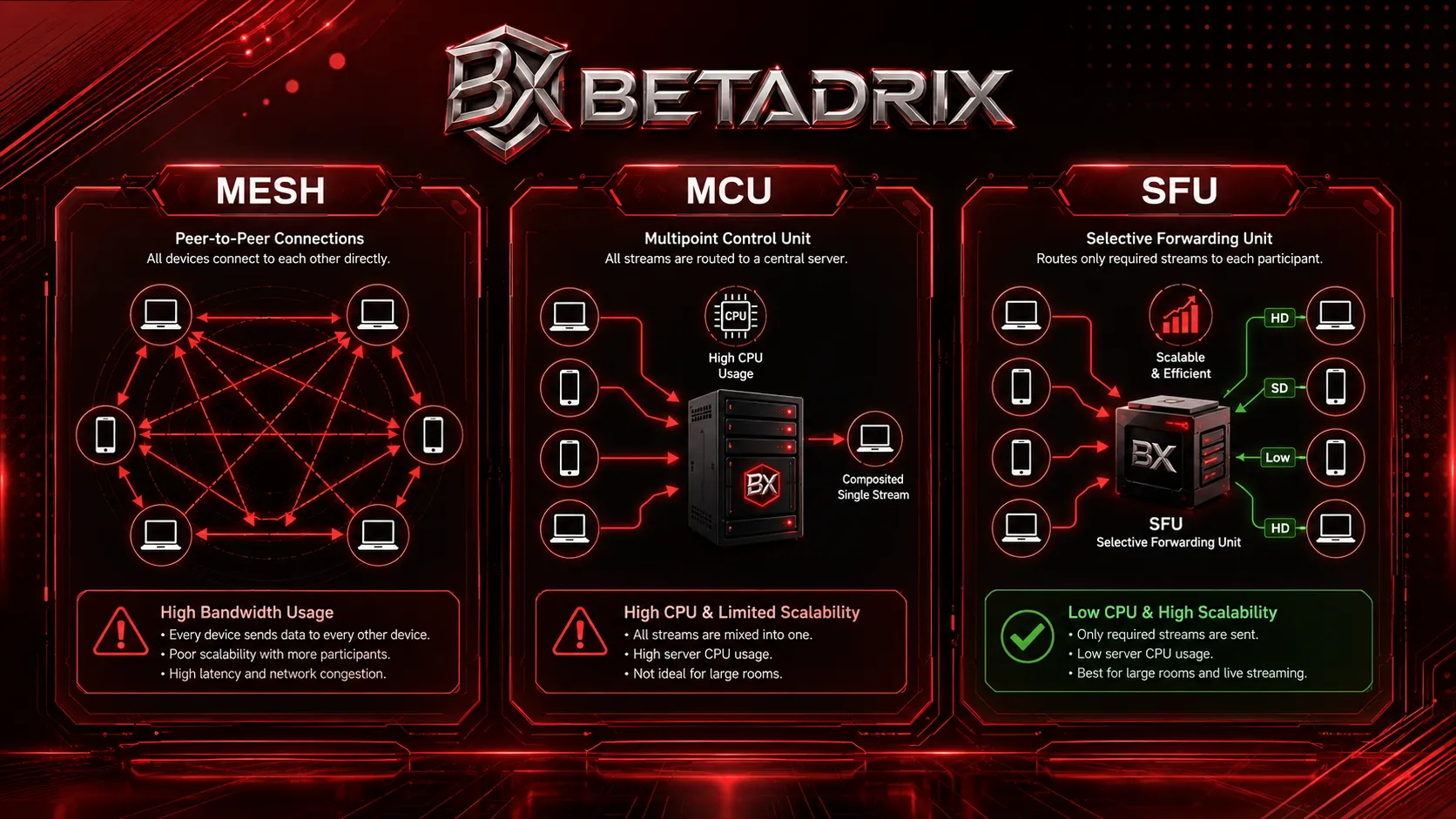
The first architectural decision in any WebRTC project is topology. Choose wrong, and your video call collapses at five participants. Choose right, and you scale to thousands without breaking your infrastructure budget.
Engineering teams face radically different constraints depending on where their users live. A telemedicine platform serving San Francisco runs on fiber with sub-200ms latency requirements and HIPAA audit trails. An ed-tech classroom app serving Tehran runs on 1–3 Mbps DSL uploads, mobile-heavy usage, and strict cost sensitivity. Both need the same fundamental decision: Mesh, MCU, or SFU? This guide compares all three across bandwidth, CPU, latency, and real-world scalability — with production thresholds drawn from architecture reviews of systems handling 8,000–12,000 concurrent sessions.
Quick Decision Matrix
| Participants | Upload Bandwidth | Latency Budget | Recommended Topology |
|---|---|---|---|
| 1-to-1 | Any | Any | Mesh (zero server cost) |
| 2–4 | < 2 Mbps per peer | < 500 ms | MCU (single composite stream) |
| 3–100 | Mixed | < 200 ms | SFU (simulcast + adaptive bitrate) |
| 100+ viewers | Mixed | < 3 s | SFU + MCU cascade |
Use this matrix as a starting point. The sections below explain the engineering behind each threshold.
Why Topology Is the Make-or-Break Decision
Before writing signaling code, decide how media flows between participants. This impacts:
- Client upload bandwidth — often the hardest constraint
- Server infrastructure cost — CPU-bound (MCU) vs. bandwidth-bound (SFU)
- End-to-end latency — critical for interactive telemedicine and financial KYC
- Compliance and recording — whether you need individual stream audit trails or composite archives
Everything else — codec selection, TURN placement, and latency optimization — follows from this choice.
Mesh (P2P): Simple, But Brutally Limited
In Mesh, every participant sends audio and video directly to every other participant. No central media server. With 4 participants, each peer maintains 3 peer connections and 3 independent outbound encodes.
Bandwidth Math
At 1.5 Mbps per video stream:
- 3 participants: 3 Mbps upload per peer
- 4 participants: 4.5 Mbps upload per peer
- 6 participants: 7.5 Mbps upload per peer
Upload bandwidth grows quadratically. Most consumer connections offer 5–10 Mbps upstream. Mesh collapses not from CPU, but from network interface saturation. Packets drop. Frames freeze.
When Mesh Makes Sense
- 1:1 video calls
- Small standups (≤3 people)
- Privacy-critical apps where no server may touch media
- Prototypes validating signaling before media server investment
MCU (Multipoint Control Unit): The Heavy Lifter
An MCU receives every stream, decodes it, composites a layout, re-encodes, and sends one unified stream back.
Advantages
- Minimal client bandwidth — one stream in, one stream out
- Legacy SIP and hardware endpoint compatibility
- Trivial server-side recording with guaranteed A/V sync
Disadvantages
- Massive CPU load: Real-time decode-mix-encode burns 1–1.5 vCPU cores per publisher
- High latency: 150–400 ms added end-to-end
- Hard to scale horizontally: Rooms shard by node; popular rooms create hotspots
Production Thresholds
| Metric | Limit |
|---|---|
| Publishers per node | 20–30 (1080p30) |
| Latency added | 150–400 ms |
| CPU per publisher | ~1–1.5 vCPU |
| RAM per node | 16–32 GB |
SFU (Selective Forwarding Unit): The Production Default
An SFU receives one stream per participant and selectively forwards appropriate layers to each recipient. It does not transcode, so CPU stays low.
Simulcast
The publisher sends multiple quality layers. The SFU forwards HD to the active speaker on fiber, and a 250 Kbps thumbnail to the mobile peer on 3G. Chrome and Safari support simulcast natively; mobile implementations require careful encoder tuning.
// Browser simulcast configuration (VP8/VP9)
const params = sender.getParameters();
params.encodings = [
  { rid: 'h', maxBitrate: 2500000, scaleResolutionDownBy: 1 },  // HD
  { rid: 'm', maxBitrate: 1000000, scaleResolutionDownBy: 2 },  // SD
  { rid: 'l', maxBitrate: 250000,  scaleResolutionDownBy: 4 }   // Low
];
await sender.setParameters(params);
SVC (Scalable Video Coding)
VP9 and AV1 encode temporal and spatial layers into a single stream. The SFU drops layers on the fly without transcoding. H.264 does not support SVC, which limits adaptive bitrate on legacy codecs.
Production Thresholds
| Metric | Capacity |
|---|---|
| Publishers per node | 100–500+ |
| Latency added | 10–50 ms |
| CPU per publisher | ~0.05–0.1 vCPU |
| RAM per node | 4–8 GB |
Head-to-Head Comparison
| Factor | Mesh | MCU | SFU |
|---|---|---|---|
| Max participants (practical) | 3–4 | 20–30/node | 100–500+/node |
| Server CPU | None | Very high | Very low |
| Server bandwidth | None | Low | Very high |
| Latency | Lowest | 150–400 ms | 10–50 ms |
| Client upload | Quadratic growth | Low (1 stream) | Low (1 stream) |
| Recording | Client-side only | Trivial (composite) | Individual streams |
| Stream control | Full | None | Full |
| Mobile suitability | Poor | Excellent | Good (adaptive) |
SFU dominates for multi-party interactive video. MCU survives only for legacy endpoints or extreme bandwidth constraints. Mesh is a cost-saving tool for 1:1 calls.
Hybrid Architectures
Pure topologies rarely survive production. Successful platforms combine them with clear switching rules.
P2P → SFU Switching
Start 1:1 in Mesh. When a third peer joins, migrate to SFU via ICE restart. This defers infrastructure cost until the conversation generates value.
SFU + MCU Cascade
Route interactive speakers through SFU for low latency, then pipe to an MCU for broadcast to passive viewers. In Mediasoup, this looks like:
// Pipe producer from SFU router to MCU broadcast router
await pipeToRouter({
  producer,
  router: broadcastRouter,
  listenIp: '0.0.0.0'
});
Decision Rules
- Room size ≤ 2 → Mesh
- Room size 3–8 + strict mobile bandwidth → MCU
- Room size 3–100 + mixed networks → SFU
- Room size 100+ with few speakers → SFU + MCU cascade
Cost Modeling
| Topology | Cost / User / Hour | Primary Cost Driver |
|---|---|---|
| Mesh | $0.00 | None (client-borne) |
| MCU | $0.05 – $0.10 | vCPU (transcoding) |
| SFU | $0.01 – $0.03 | Bandwidth (egress) |
These are rough AWS c6i estimates. Actual costs vary by region, egress pricing, codec efficiency, and simulcast layer distribution. A VP9 SVC stream at 1 Mbps costs less than an H.264 simulcast stack at 2.5 Mbps. Design your bitrate ladder before provisioning infrastructure.
Disclaimer: Figures are directional only. Run your own load tests on target infrastructure before committing to budget.
Failure-Mode Monitoring
Watch these signals in production:
- ICE failure rate > 5% → Check TURN credentials and STUN reachability
- RTT > 250 ms sustained → Switch to TURN relay or drop simulcast layer
- MCU CPU > 75% → Cap new publishers or spill to secondary node
- SFU NIC utilization > 70% → Horizontal scale (new node)
- Packet loss > 2% → Trigger TWCC/REMB downscale immediately
- Audio energy but zero RTP → Encoder failure; restart producer
Deployment Context: Bandwidth Reality
Network constraints are not theoretical. In markets with fiber-rich infrastructure, Mesh reaches its 4-participant limit before bandwidth becomes the bottleneck. In markets where residential DSL offers 1–3 Mbps upstream, Mesh dies at 2–3 peers. MCU becomes attractive for mobile endpoints on constrained networks because it sends exactly one stream. SFU with aggressive simulcast (250 Kbps low layer) bridges both worlds, but requires robust cloud infrastructure to manage bandwidth costs.
Technology Stack Notes
Your topology constrains server selection:
- Mediasoup: SFU-first, Node.js/Rust/C++ core. Excellent for custom routing and simulcast control.
- Janus: Plugin-based. Supports SFU, MCU, and recording. Good for hybrid setups.
- Jitsi Videobridge: SFU optimized for Meet-style conferences.
- Pion: Pure Go. Lightweight embedding into existing backends.
See the Mediasoup documentation and WebRTC.org overview for protocol-level details. For production implementation, our engineering team provides security hardening and full-stack integration.
Common Architecture Mistakes
- Ignoring TURN bandwidth: Budget 30% of total media volume for relay.
- Static bitrates: Networks fluctuate. React to TWCC/REMB within 200 ms.
- Undersized SFU instances: SFU is bandwidth-bound. Use high-ENA instances (c6i.2xlarge+).
- Wrong codec for SVC: H.264 lacks SVC. Use VP9 or AV1 if layer dropping is required.
- No graceful degradation: Drop resolution before frame rate. Pixelation beats stutter.
Architecture Decision Checklist
- □ Max participants per room? Mesh (≤2), MCU (≤8), SFU (3–100), Hybrid (100+)
- □ Minimum user upload bandwidth? Mesh needs 3+ Mbps per peer; MCU/SFU need <1 Mbps
- □ Latency budget? <200 ms → SFU; <500 ms → MCU acceptable; any → Mesh
- □ Server-side recording required? Individual streams → SFU; composite → MCU; none → Mesh
- □ Legacy SIP endpoints? Yes → MCU; No → SFU
- □ Compliance / audit trails? HIPAA/SOC 2 → SFU with individual stream recording
Conclusion
Mesh is a teaching tool, not a production topology for groups. MCU solves niche bandwidth-constraint problems at the cost of latency and server overhead. SFU is the industry default because it balances scale, latency, and flexibility.
The best architectures are hybrid: start in P2P, migrate to SFU as rooms grow, and cascade to MCU only when broadcasting to passive audiences. Measure bandwidth and CPU at every threshold. Test on real networks. And place TURN infrastructure close to your users.
Related Services from Betadrix
At Betadrix, we specialize in delivering enterprise-grade solutions. Explore our related services to see how we can assist with your technology goals: Casino Sportsbook Development Services | Betadrix, Banking Software Development, Custom WebRTC Application Development, WebRTC Consulting & Architecture Review, SFU & Media Server Deployment, WebRTC Mobile App Development, WebRTC Security & Compliance Hardening, Hire Dedicated WebRTC Developers.
Hire WebRTC Engineers
Hire dedicated WebRTC engineers with production experience in Mediasoup, Janus, and Pion. Available for remote and on-site engagements.
Related Services
?Frequently Asked Questions
What is the primary difference between SFU, MCU, and Mesh WebRTC topologies?
Why does Mesh topology fail for group video calls?
When should an engineering team choose SFU over MCU?
What is the maximum number of participants in a Mesh WebRTC call?
How much CPU does an MCU media server use per participant?
Why is SFU better than MCU for video conferencing?
What is simulcast in WebRTC and why does it matter for SFU?
Can you switch from Mesh to SFU during an active WebRTC call?
Which WebRTC topology works best for low-bandwidth networks?
What WebRTC architecture do healthcare platforms typically use?

SK Khan
Lead WebRTC ArchitectSK Khan leads real-time media engineering at Betadrix, architecting WebRTC deployments handling 8,000–12,000 concurrent sessions across telemedicine, fintech, and ed-tech platforms. He specializes in SFU scaling, simulcast optimization, and cross-border low-latency streaming.
Recognized & Verified Excellence
Trusted by Technical Leaders Worldwide
Verified ratings across global enterprise review platforms for custom software, AI development, and cloud engineering.
More Articles in Architecture





Related services built to solve your specific challenges




Watch.
Learn.
Grow.
Discover how our engineered solutions transform industries and propel client operations forward.

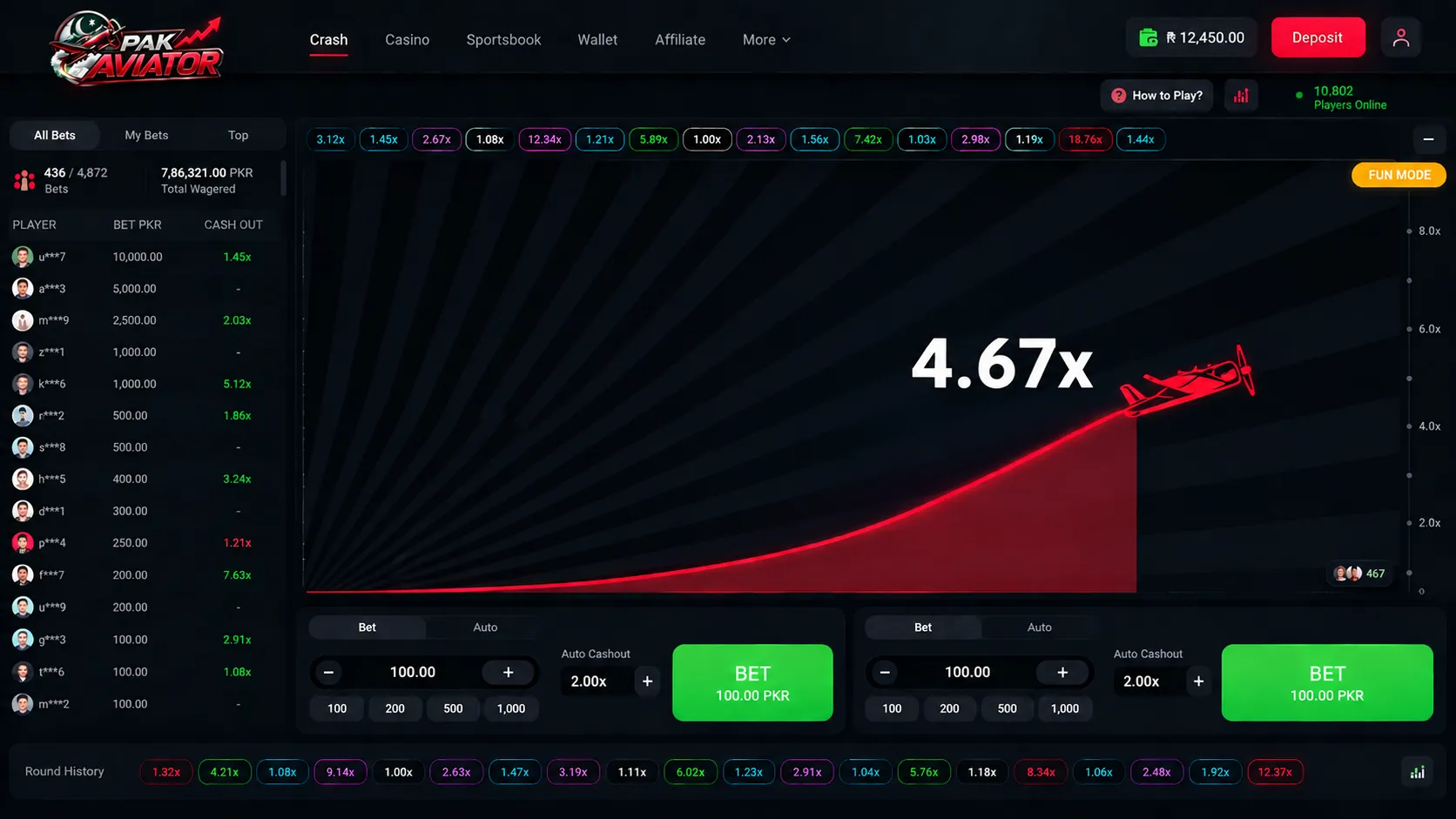
Owning the Game, Not Renting It: Custom Crash Game Development for a Lahore-Based iGaming Operator
READ CASE STUDYTechnologies & Frameworks Powering This Service

WebRTC Development: SFU Architecture, Latency Optimization & Production Engineering Guide
architecture


Hire Specialized Developers For Your Service Project

Nodejs Developers
Pre-vetted senior Nodejs Developers ready to deploy into your existing architecture in 3-7 days.
React Developers
Pre-vetted senior React Developers ready to deploy into your existing architecture in 3-7 days.
Flutter Developers
Pre-vetted senior Flutter Developers ready to deploy into your existing architecture in 3-7 days.

Python Developers
Pre-vetted senior Python Developers ready to deploy into your existing architecture in 3-7 days.
What Our Clients Say
“Mobile app development and cloud migration were handled smoothly. Strong technical skills, clear communication, and dependable post-launch support stood out throughout the engagement.”

Sarah Mitchell
Director of Operations, HealthFirst Clinics
Have a Project in Mind?
Let's Build It Together.
Connect directly with our senior software architects and technical leads. We evaluate your requirements and deliver an actionable technical proposal within 24 hours.
Strict NDA Protection
Your intellectual property and technical specs remain 100% confidential.
24-Hour Response Guarantee
Guaranteed evaluation and scoping reply from an engineering manager.
Zero Obligation Estimate
Get accurate cost breakdowns and tech stack recommendations free of charge.
Request Free Technical Consultation
Let's build something serious.
Diagnose your system architecture, budget ranges, and roadmap parameters with an expert.
Scoping Diagnostic
Analyze your workflows in 60 seconds. A senior AI architect reviews every parameter personally.
 4.9/5.0 Partner
 4.8/5.0 Leader
 4.9/5.0 Rated
 4.8/5.0 Excellent
Not sure where AI actually moves the needle for you?
Answer a few brief questions. We will deliver a highly concrete scoping plan within 24 hours including:
- Recommendations on automation use-cases and MVP components
- Calculations on expected ROI and engineering timelines
- A structural roadmap to make your legacy stack AI-native