

WebRTC Development: Architecture, Latency & Production Engineering
Trusted by global enterprises
- 700+
- Projects Delivered
- 450+
- Clients Served
- 20+
- Countries
- 6+
- Years Experience
What Is WebRTC and How Does It Work?
WebRTC is an open-source framework maintained by Google, Mozilla, and Apple that provides browsers and mobile applications with real-time communication capabilities. It consists of three primary JavaScript APIs:
- getUserMedia: Captures camera and microphone streams with constraints for resolution, frame rate, and echo cancellation.
- RTCPeerConnection: Manages the entire peer-to-peer lifecycle: encoding, packetization, NAT traversal, encryption, bandwidth estimation, and jitter buffer management.
- RTCDataChannel: Transfers arbitrary data directly between peers over SCTP, tunneled through DTLS.
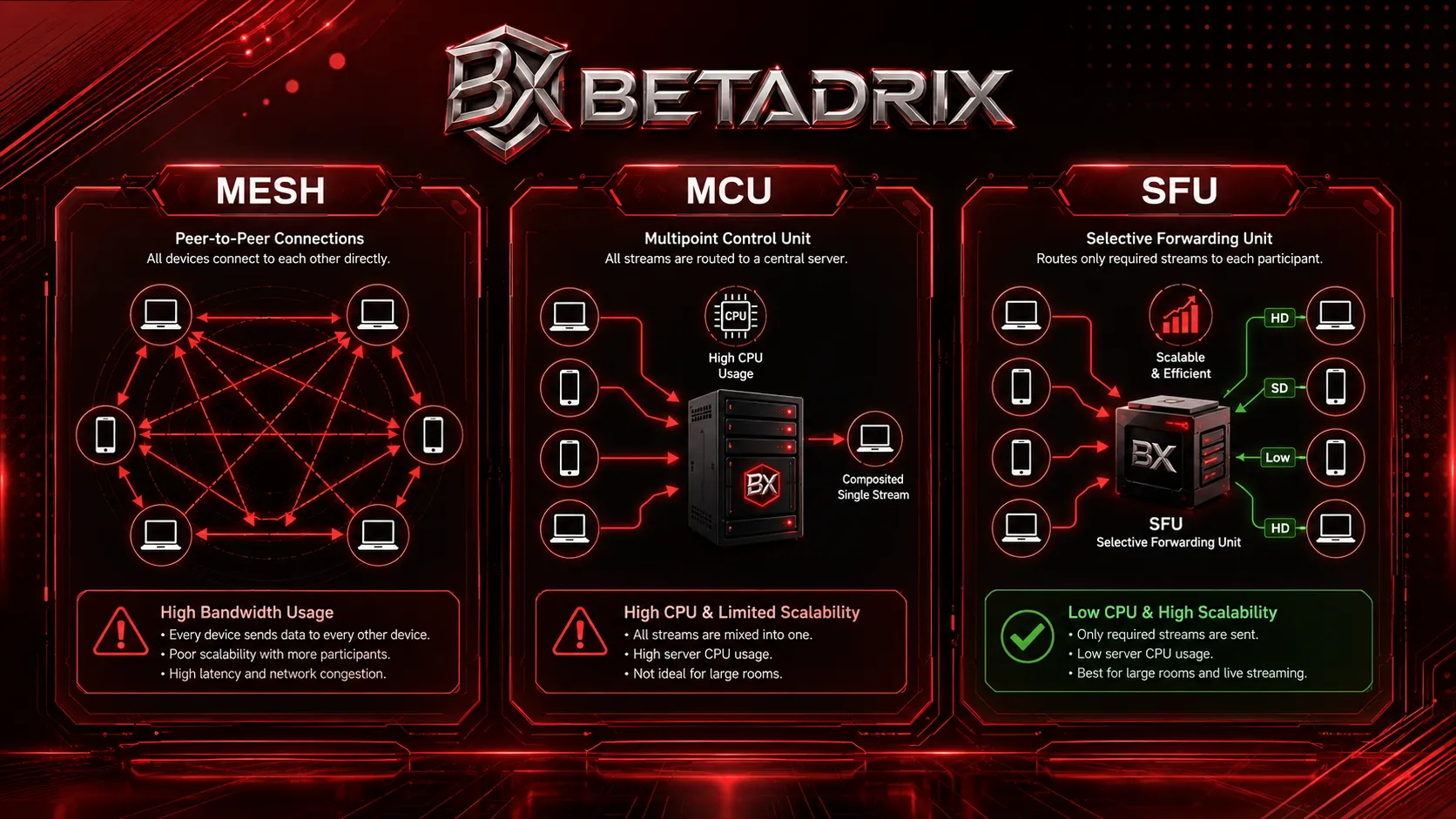
Despite the name, WebRTC connections are rarely pure peer-to-peer in production. Most commercial applications — video conferencing, telehealth, live streaming — route media through an intermediary Selective Forwarding Unit (SFU) to manage bandwidth and scale beyond a handful of users.
Browser Support and Standards Maturity
WebRTC is now a W3C standard supported in all evergreen browsers. However, implementation details vary:
- Chromium (Chrome, Edge, Opera): Uses libwebrtc, the reference implementation. Most feature-complete but occasionally deprecates APIs with short notice.
- Firefox: Gecko media pipeline with strong Opus audio support and early adoption of new specifications.
- Safari: WebKit implementation historically lagged in codec support (mandatory H.264 baseline) but has reached parity for core conferencing features since iOS 15 and macOS Monterey.
The Core Challenge: Why Most WebRTC Projects Fail at Scale
WebRTC tutorials create a false sense of security. A 20-line JavaScript snippet establishes a video call on a local network. Production environments introduce failure modes that only appear under real-world constraints:
Signaling Bottlenecks
WebRTC intentionally does not define a signaling protocol. Most teams default to Socket.io or a basic WebSocket server. Under load, these collapse because:
- Room state is held in memory without replication, so a server restart drops all active calls.
- JSON serialization of SDP blobs becomes a CPU bottleneck at high concurrency.
- Broadcasting presence updates to 500+ room members creates head-of-line blocking.
NAT Traversal Gaps
A system tested on home Wi-Fi will fail silently for enterprise users behind symmetric NATs or UDP-restricted firewalls. The symptom is a black screen with no error message, because the ICE state simply stalls at checking or failed.
Mesh Bandwidth Collapse
In a mesh topology with n participants, each peer uploads (n – 1) video streams. Four participants at 2 Mbps each means 6 Mbps upload per user — exceeding most mobile uplinks. Without topology migration, group calls degrade immediately.
Codec and Device Fragmentation
Safari requires H.264 baseline profile. Chrome prefers VP9. Hardware encoders on Android devices support only specific H.264 levels. If your application does not negotiate codecs dynamically or provide software fallback, connections fail on specific device and browser combinations that are impossible to predict during development.
Build Your Custom Project
Connect with technical architects for scope and estimation.
WebRTC Signaling & Connection Negotiation
Signaling is the control plane that bootstraps every WebRTC connection. It is responsible for exchanging Session Description Protocol (SDP) offers and answers, and for coordinating Interactive Connectivity Establishment (ICE) candidate gathering so peers can find a network path to each other.
Anatomy of an SDP Offer
An SDP message describes the media capabilities and transport parameters of a peer. A typical offer contains:
- Session-level metadata: Version, origin, timing, and connection information.
- Media descriptions (m= lines): One per media stream (audio, video, application for DataChannels).
- Attribute lines (a=): Define codecs (rtpmap), payload types (fmtp), ICE credentials (ice-ufrag, ice-pwd), DTLS fingerprints (fingerprint), and candidate lists.
Production systems often strip SDP to essentials — removing unsupported codec payloads and redundant rtcp-fb lines — to reduce parsing overhead and handshake size.
Signaling Transport Architectures
| Transport | Best For | Tradeoffs |
|---|---|---|
| WebSockets (Native) | Standard video conferencing | Requires custom reconnection logic; no built-in room semantics. |
| Socket.io | Rapid prototyping | Polling fallback adds latency; room state is single-node by default. |
| gRPC + Protobuf | Gaming, high-frequency data | Binary efficiency; harder to debug than JSON. |
| MQTT / Redis Pub-Sub | IoT, intermittent connectivity | Lightweight but not ideal for ordered SDP exchange. |
Trickle ICE and Renomination
Trickle ICE sends candidates to the remote peer as they are discovered, rather than gathering all candidates before sending the offer. This typically halves connection establishment time. ICE renomination allows the connection to migrate to a better path mid-call — for example, when a user switches from Wi-Fi to cellular — without a full renegotiation.
Understanding ICE: Candidate Types and Nomination
ICE is the mechanism that finds a viable network path between peers. Understanding the four candidate types is essential for debugging connection failures.
The Four ICE Candidate Types
| Type | Description | Priority |
|---|---|---|
| Host | Local interface address (LAN, loopback, VPN). | Highest — used when both peers share a network. |
| Server Reflexive (srflx) | Public IP discovered via STUN server. | Medium — works for most home routers with cone NAT. |
| Peer Reflexive (prflx) | Public IP discovered via STUN probe from the remote peer. | Medium — similar to srflx but discovered during connectivity checks. |
| Relayed (relay) | Address on a TURN server that proxies media. | Lowest — used only when direct paths fail. |
ICE Lite vs. Full ICE
Full ICE gathers candidates, performs connectivity checks, and nominates a pair. Browsers always use full ICE. ICE Lite skips candidate gathering and only responds to checks. It is suitable for server endpoints with public IP addresses (SFUs, media servers) because it reduces server-side CPU and complexity.
Debugging ICE Failures
When a connection fails, Chrome's chrome://webrtc-internals and Firefox's about:webrtc expose the ICE state machine. Key diagnostic steps:
- Verify that both sides are generating candidates of the expected types.
- Check if
relaycandidates are present; if not, the TURN server is unreachable or misconfigured. - Examine the
selectedCandidatePair: if it showsrelay <-> relay, the connection is functional but routing through TURN, which increases latency and server cost. - Look for
consentcheck failures, which indicate that a previously valid path was blocked by a firewall rule change mid-call.
SFU (Selective Forwarding Unit) Architecture
The topology decision is the most consequential architectural choice in a WebRTC project. It determines concurrency limits, server costs, latency characteristics, and client battery life.
Mesh vs. MCU vs. SFU: A Production Comparison
| Topology | Upload per Peer | Server CPU | Latency | Max Participants |
|---|---|---|---|---|
| Mesh | (n – 1) × bitrate | None | Lowest | 3–4 (bandwidth limited) |
| MCU | 1 × bitrate | Very High (decode + composite + encode) | High (generational delay) | 20–30 per node |
| SFU | 1 × bitrate | Low (forward only) | Low | 500+ viewers per node |
Simulcast and Scalable Video Coding (SVC)
Modern SFUs leverage simulcast, where the sender encodes the same video at multiple resolutions (e.g., 1920×1080, 1280×720, 640×360) simultaneously. The SFU then forwards only the layer appropriate for each viewer's bandwidth and screen size. This ensures that a user on a 4G phone does not force the presenter to degrade quality for desktop viewers.
SVC (Scalable Video Coding) takes this further by encoding temporal and spatial layers into a single stream rather than separate simulcast streams. VP9 and AV1 support temporal SVC natively, reducing upload bandwidth compared to full simulcast at the cost of higher decoder complexity.
Bandwidth Estimation and Congestion Control
SFUs do not blindly forward packets. They implement Google Congestion Control (GCC) or SCReAM to estimate available downstream bandwidth per viewer and request lower simulcast layers when packet loss or jitter increases. A well-tuned bandwidth estimator prevents the "snowball effect" where transient congestion causes cascading quality degradation.
Production SFU Platforms
- Mediasoup: Node.js/Rust SFU with worker-thread parallelism. Best for applications requiring custom audio routing, spatial audio, or direct RTP pipe manipulation.
- Janus Gateway: C-based plugin architecture. Best for protocol bridges (SIP, RTSP, streaming) and low-level customization.
- Jitsi Videobridge: Mature Java SFU with built-in simulcast, bandwidth estimation, and Octo bridge for inter-region media routing.
- Pion: Pure Go implementation. Best for cloud-native, containerized deployments where binary size and memory footprint are critical.
At scale, SFUs are deployed in geo-distributed clusters with Redis-backed room state, so a user in Tokyo connects to an APAC edge node while a London user connects via an EU relay, minimizing last-mile latency.
TURN/STUN Relays & NAT Traversal
Approximately 15–20% of WebRTC connections cannot establish direct peer-to-peer paths. In enterprise environments with symmetric NATs, captive portals, or UDP-blocking firewalls, this figure is significantly higher. TURN and STUN infrastructure is not optional for production systems — it is a reliability requirement.
How STUN Works
A STUN server (typically running on UDP port 3478) receives a binding request from a client and returns the client's public IP and port as seen from the internet. This allows a peer behind NAT to learn its external address and share it with the remote peer via signaling. STUN is lightweight and stateless, but it fails against symmetric NATs where the port mapping is unique per destination.
How TURN Works
When direct connectivity fails, TURN acts as a media relay:
- The client sends an Allocate request to the TURN server, authenticated with a username and password (often time-limited credentials).
- The server allocates a relay address and port, returning it to the client as a
relayICE candidate. - The client sends CreatePermission requests to authorize the remote peer to send data to that relay address.
- Media flows through the TURN server, which copies packets between the client and the peer without inspecting content.
Building a Resilient Relay Stack
Production deployments typically include:
- Coturn clusters across multiple cloud regions with auto-scaling policies triggered by connection count and egress bandwidth.
- Dual-stack IPv4/IPv6 with DNS-based geolocation routing users to the nearest relay.
- TCP fallback on port 443 disguising WebRTC as HTTPS traffic, essential for corporate networks that block all UDP.
- TURN over TLS for environments with aggressive deep packet inspection (DPI).
A properly configured TURN/STUN stack can push global connection success rates into the high nineties, even across diverse and restricted network topologies.
Low-Latency Video & Audio Pipelines
End-to-end latency in WebRTC is the sum of capture, encoding, network transit, jitter buffering, decoding, and render time. For interactive use cases — telehealth, live auctions, cloud gaming, and financial trading — the total must stay under 500ms, with optimized pipelines reaching 200ms or less.
Codec Selection: VP9, H.264, and AV1
| Codec | Compression Efficiency | CPU Cost | Browser Support | Best Use Case |
|---|---|---|---|---|
| VP8 | Baseline | Low | Universal | Legacy compatibility |
| VP9 | ~40% better than VP8 | Medium | Chrome, Firefox, Edge | General conferencing |
| H.264 | Similar to VP8 | Low (hardware) | Universal (Safari requires it) | Mobile, hardware decode |
| AV1 | ~50% better than VP9 | Very High | Chrome, Edge (partial) | 1:N broadcasting |
Audio Processing Stack
Users tolerate poor video longer than poor audio. Production pipelines layer multiple processing stages:
- AEC3 (Acoustic Echo Cancellation): The browser-default algorithm, but it requires tuning for long echo tails in open offices and conference rooms.
- AI Noise Suppression: Libraries such as RNNoise or DeepFilterNet use neural networks to remove keyboard clicks, HVAC noise, and street sounds with fewer artifacts than traditional spectral subtraction.
- Automatic Gain Control (AGC): Prevents volume spikes when users move from quiet to noisy environments.
- Opus FEC & DTX: Forward Error Correction reconstructs lost audio packets. Discontinuous Transmission stops sending packets during silence, reducing bandwidth by 30–50% in voice-heavy calls.
Jitter Buffer and Playout Delay
The jitter buffer absorbs network variability by holding incoming packets before playout. A small buffer minimizes latency but risks underruns (audio gaps) under jitter. A large buffer eliminates gaps but adds perceptible delay. Adaptive jitter buffers — standard in modern browsers — resize dynamically based on observed packet inter-arrival times, typically settling between 50ms and 200ms depending on network stability.
Frequently Asked Questions
Transforming the everyday, for multiple industries, and scaling digital impact

AI Models Development Guide: Types, Uses & How They Work

Single-Wallet iGaming Platform Architecture: A Practical Guide
Related services built to solve your specific challenges






Watch.
Learn.
Grow.
Discover how our engineered solutions transform industries and propel client operations forward.

Pharmaceutical Traceability Software Built for Real-World Supply Chains
READ CASE STUDY

Hire Specialized Developers For Your Service Project
Full-Stack Developers
Pre-vetted senior Full-Stack Developers ready to deploy into your existing architecture in 3-7 days.

AI Developers
Pre-vetted senior AI Developers ready to deploy into your existing architecture in 3-7 days.

Android Developers
Pre-vetted senior Android Developers ready to deploy into your existing architecture in 3-7 days.
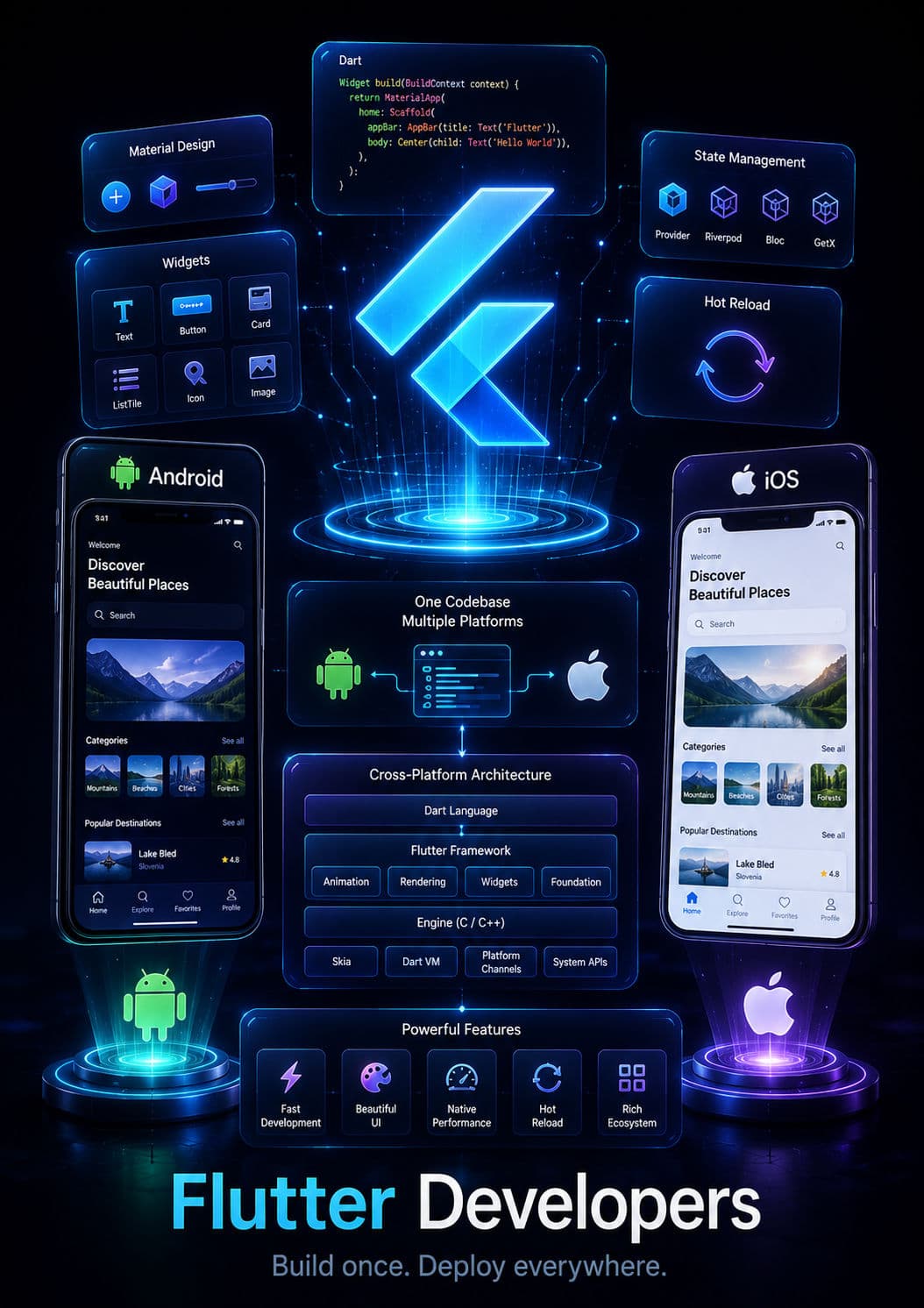
Flutter Developers
Pre-vetted senior Flutter Developers ready to deploy into your existing architecture in 3-7 days.
Let's build something serious.
Diagnose your system architecture, budget ranges, and roadmap parameters with an expert.
Scoping Diagnostic
Analyze your workflows in 60 seconds. A senior AI architect reviews every parameter personally.
 4.9/5.0 Partner
 4.8/5.0 Leader
 4.9/5.0 Rated
 4.8/5.0 Excellent
Not sure where AI actually moves the needle for you?
Answer a few brief questions. We will deliver a highly concrete scoping plan within 24 hours including:
- Recommendations on automation use-cases and MVP components
- Calculations on expected ROI and engineering timelines
- A structural roadmap to make your legacy stack AI-native